
We use cookles to Improve your online experience. By continuing browsing this website, we assume you agree our use of cookies.
Home > Blog > Troubleshooting > Test hash board(Antminer) one by one

Test hash board(Antminer) one by one

By THANOS MINING May 8th, 2020
Test hash board(Antminer) one by one

1. Make sure the PSU (the light can be found), control board(the miner status can be found) and two fan work well.

2. Make sure the tested hash board is connected with the control board and PSU while the another two are disconnected.

Connecting picture,

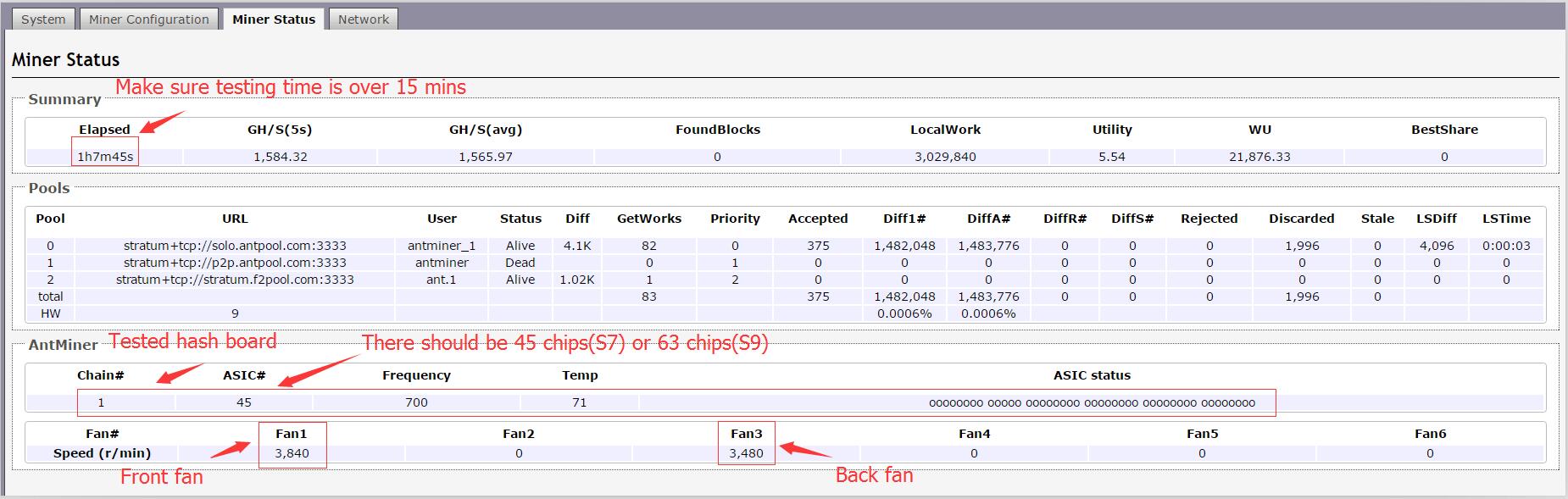
Normal miner status of testing hash board,
Possible problems and solutions for Antminer S7, Antminer S9 (fixed frequency) & Antminer L3+
Previous
Possible problems and solutions for Antminer S7, Antminer S9 (fixed frequency) & Antminer L3+
Read More
Antminer/Whatsminer PSU Wake-up/Startup Tester Manual
Next
Antminer/Whatsminer PSU Wake-up/Startup Tester Manual
Read More